
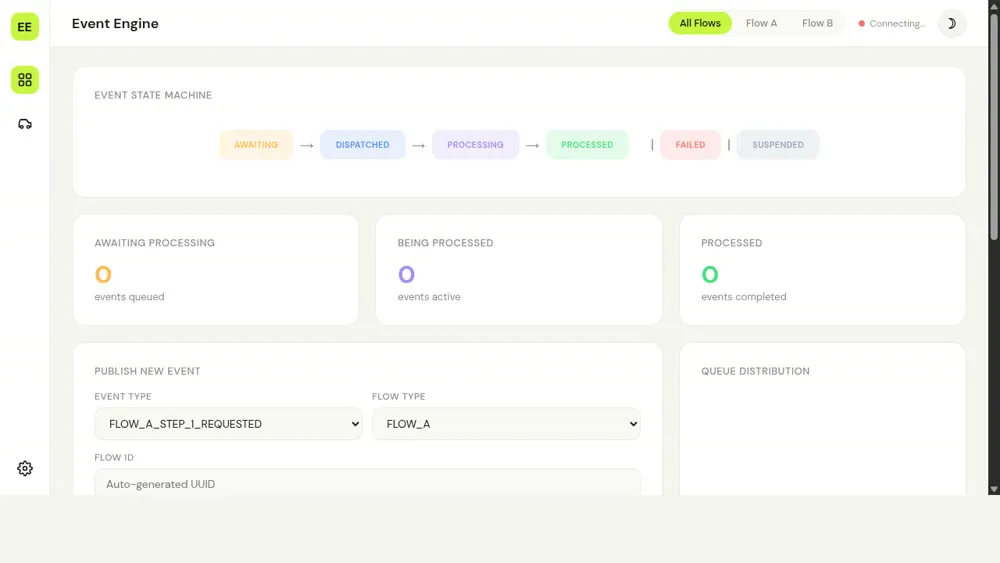
I built this project to understand event-driven architecture in practice, not just from blog posts. I wanted to see jobs move through a system, fail, retry, and recover in a way I could watch in real time.
The result is a small event-driven job engine written in Go. Here is how it works.
Why I cared about events in the first place
Most real apps have background work:
- send an email after a signup
- charge a card at the end of the month
- generate a report once a day
When you are in a hurry, this work grows randomly:
- a cron script here
- a table with a status flag there
- a queue that only one part of the app knows about
After a while, you have a mess of special cases.
I wanted one consistent model:
Treat every piece of background work as an event that moves through a clear set of states.
That model looks like this:
- awaiting processing
- dispatched
- being processed
- succeeded
- failed (with retry rules)
- suspended
- expired
The engine’s job is to move events safely between these states.
Seeing the engine in action
The code lives here:
https://github.com/xceejay/event-driven-golang
Once you have Go, MySQL, Redis, and NATS running, you can start the engine with:
make engineThen open the UI:
open http://localhost:8080You will see a small web page that lists events and their current state. It looks like this:
When the engine is running against a real database and broker, the UI connects over server-sent events and WebSocket and shows you:
- when a new event is created
- when it is picked up for work
- when it succeeds or fails
- when it is retried or expires
That turns “event-driven architecture” from a diagram into something you can watch.
When the Railway deployment is up you can hit the same UI at https://eda-engine-production.up.railway.app.
The main pieces
The engine has four main parts:
- A server that exposes a small API
- A lifecycle service that knows how events are allowed to move
- Storage for events, payloads, and configuration
- Workers that move events forward on a schedule
The server
The server is a Go HTTP service. It:
- accepts new events
- lets workers ask for work
- records when events succeed or fail
- streams live updates to the web UI
It also exposes a set of tools using MCP (Model Context Protocol) so AI agents can drive the engine, but you can ignore that detail if you just care about Go and queues.
The lifecycle service
This part of the code knows the rules for state changes. For example:
- from
awaiting processingyou can go todispatched - from
dispatchedyou can go tobeing processed - from
being processedyou can go tosucceededorfailed
Every event type gets a configuration row in MySQL. That config says things like:
- how many attempts are allowed
- how long the event can live before it expires
- how long to wait before the first and later attempts
When you publish an event the lifecycle service looks up that config, calculates the first scheduled time and expiry, and writes both the event row and its payload. When a worker reports success or failure, the lifecycle service checks that the move is valid, updates the row, and decides whether to retry or stop based on that same configuration.
Storage
The engine uses:
- MySQL to store events and configuration
- Redis to store payloads (or an in-memory map in development)
- Prometheus metrics to track queue sizes and processing
You could swap these pieces out, but they are enough to keep the engine simple and real.
The workers and NATS
For actual processing the engine uses two things:
- scheduled jobs inside the Go process
- a NATS message broker on the edge
The scheduled jobs are just goroutines with time.Ticker. They:
- look for events that are ready to be processed
- schedule future events when their time comes
- expire events that have been suspended too long
- update queue metrics
When an event is ready, the engine publishes it to a NATS subject. A small adapter subscribes to that subject, does the real work (for example, send an email or hit an external API), and then tells the engine whether it succeeded or failed.
I chose NATS because:
- it is small and fast
- the Go client is solid
- you get per-message time-to-live support for free
How one event moves through the system
Take a single RIDE_REQUESTED event.
- The UI calls
POST /api/eventswith:event_type = "RIDE_REQUESTED"flow_type = "FLOW_B"for rides- a
flow_idthat identifies the ride - a JSON payload with pickup and destination
- The server validates the body and asks the lifecycle service to publish the event.
- The lifecycle service loads the config for
RIDE_REQUESTED, calculates when the first attempt should run and when the event should expire, and inserts two rows:- one in the
eventtable with stateawaiting processing - one in the
event_payloadtable with the JSON payload
- one in the
- A scheduled job wakes up, finds events that are due, and marks them as
dispatched. - For each dispatched event it publishes a message to NATS on a subject like
event-engine.flow_bwith a copy of the event ID and payload. - The ride adapter receives that message and calls
POST /api/events/{id}/acquireto lock the event and fetch the payload. - After doing its work the adapter calls either:
POST /api/events/{id}/successwith optional spinoff events, orPOST /api/events/{id}/failurewith an error message.
- The lifecycle service updates the event row based on that call and, if there were spinoff events, publishes those as brand new events in the same flow.
The same pattern works for email, payouts, or anything else that moves through a few clear states and needs retries.
A concrete example: the ride-hailing demo
The easiest way to see this engine in real life is the small ride-hailing demo I built on top of it. One ride request becomes six separate events:
- RIDE_REQUESTED
- DRIVER_MATCHED
- DRIVER_ARRIVED
- TRIP_STARTED
- TRIP_COMPLETED
- PAYMENT_PROCESSED
Each step has its own configuration for retries and timing. When one step succeeds, the worker reports success and asks the engine to publish the next event in the chain. If a step fails, the engine can retry just that step without losing the overall ride.
On the live demo the HTML UI connects to the engine and shows one ride at a time moving through those stages. You can request a ride, watch the events appear, fail, retry, and eventually complete.
Where this pattern shows up in payments
Payment systems follow a similar pattern. A single purchase might involve:
- creating a payment attempt
- sending it to a card network or PSP
- waiting for a callback
- capturing funds
- issuing a receipt or notification
Each step needs to be idempotent and recoverable so that if a request or callback is retried, money is not charged twice and no payments are lost.
An engine like this gives you:
- a table that records the current state of each payment attempt
- retry rules that live in one place instead of being scattered in handlers
- a single API for workers to report success or failure, with a clear version and status
You still need to design the payment events carefully, but the mechanics of “move between states and do not lose work” are the same as the ride example.
How this helped me understand event-driven systems
A few things clicked for me while building this:
- States matter more than functions. Once I wrote down the event states, many design decisions became obvious.
- Centralising the lifecycle removes a lot of guesswork. Instead of each feature inventing its own retry logic, the engine owns it.
- Simple tools are enough. Goroutines, tickers, and a small broker like NATS cover a lot of background job needs.
- A visual UI is worth the time. Seeing events move made it easier to debug than reading logs.
If you want to learn from it
A simple way to use this project is:
- Clone the repo
- Skim the
PLAN.mdto see the intended architecture - Run
make engineand open the UI - Trigger a few events and watch how they move
- Read the lifecycle and worker code with the UI open
You do not have to use this engine in production to learn from it. The goal was to build a concrete example that shows how jobs can move through a system in a controlled way without a lot of framework magic.